Leafy Corner Pots and Furniture
Compendium decor that frames your plants and finishes task objectives.
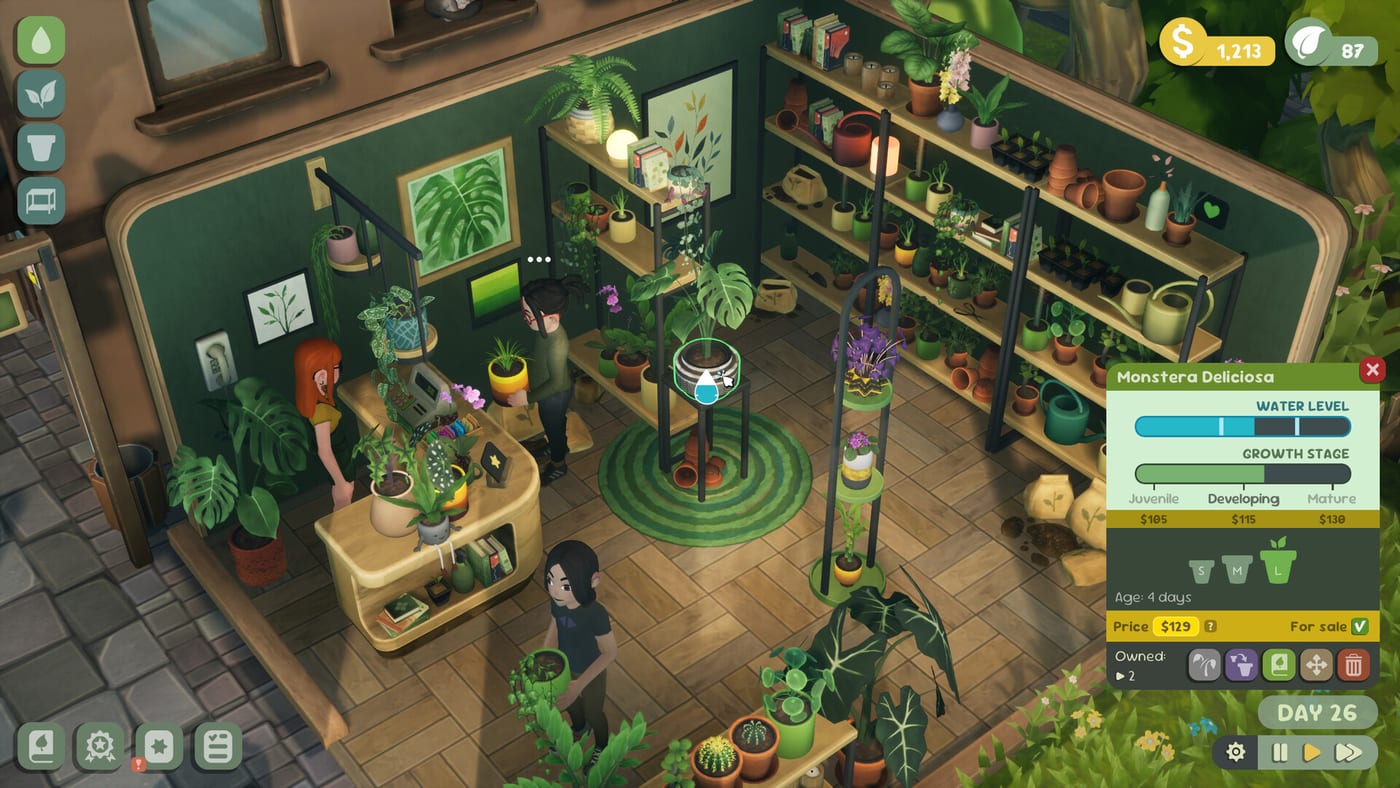
Decor is progression, not just pretty screenshots
Pots and furniture in Leafy Corner come from the same compendium currency as new species: Plant Tokens earned through the task list and reputation milestones. Fireline Games treats decorating as part of the cozy loop—complete a layout objective, claim tokens, buy a shelf, arrange plants again. No external furniture DLC required at the $9.99 base launch July 30, 2026.
This page helps you spend decor tokens without starving plant unlocks covered in How to Unlock Plants.
Types of decor items
Pots — Change vessel color and silhouette per plant. Some tasks demand specific pot styles on display.
Furniture — Shelves, counters, and accent pieces define browsing paths for customers in How to Help Customers.
Layout props — Rugs, signs, and cozy accents appear as you progress—exact catalog grows post-demo.
Everything pulls from Plant Tokens, not premium currency. Budget alongside species purchases in the compendium—species and decor share tabs.
Task-linked purchases
Before buying, open the task list. If an active objective wants “place two new shelves,” buy furniture first. If another wants “unlock a new species,” skip pot duplicates. Tasks often pay enough tokens to refund smart decor buys.
Reputation gains from finished decor chains feed Shop Expansion unlocks—do not hoard tokens forever on bare floors. Empty shops slow reputation even when plants are healthy in back rooms.
Layout tips tied to decor
Elevated shelves keep pots visible during camera rotations from Controls. Pet-safe zones benefit from dedicated furniture groupings—see Pet-Safe Plants.
Place variegated showpieces on focal furniture near the entrance. Shoppers screenshot cozy corners; reputation responds to first impressions.
Leave walking lanes wide enough for customer interaction prompts—cluttered aisles slow service during busy moments.
Watering access after redesign
Every redesign must preserve watering routes. Blocking pots behind tall furniture causes hidden whites. Walk a full pass after moving shelves.
Toggle watering mode off while dragging furniture if mis-clicks on blue pots cause rot.
Demo decor limits
Steam demo includes a decor subset. Learn purchasing UI and task links, then expand catalog at launch. Demo guide lists time expectations (~30 minutes early clear).
Demo furniture teaches compendium navigation—launch adds more styles without changing token rules.
Spending checklist
- Read active tasks.
- Confirm plant stock gaps via Plants hub.
- Buy furniture that completes an objective.
- Re-run watering route.
- Check reputation progress.
Pre-release vs launch decor
Fireline may add furniture entries at launch—token economy stays task-driven. Do not assume demo catalog equals retail catalog size.
Seasonal layout refreshes
Rotate featured pots monthly in long play sessions—same species in new vessels keeps browsers interested without new token spend. Pair refreshes with watering checks so moves do not hide thirsty pots.
Token budget example
Early demo session: one species unlock, one furniture task completion, one pot color if objective demands—defer duplicate decor until How to Unlock Plants trait gaps close. Furniture that completes tasks often pays for itself via Plant Tokens rewards.
Coordinating decor with customer flow
Place interaction-friendly gaps between shelves so browsers do not clip prompts—especially after adding rugs or low props. Test walk paths after each furniture move using How to Help Customers scenarios in demo.
Pre-launch decor planning
Screenshot demo layouts you like—furniture catalog expands at launch but token-task loop stays identical. Plan focal shelves for variegations before spending launch-day tokens impulsively.
Color and mood tips
Pick pot colors that contrast leaf variegation so shoppers notice rare stock—pale pots behind dark foliage, warm wood tones behind silver leaves. Mood shifts in wall and floor color options (demo-confirmed) should stay readable under Steam Deck Verified brightness so droplet icons remain obvious during watering.
Related pages
- Shop hub — overall storefront strategy
- Guides hub — token farming
- Tools — customer trait practice
- Release — launch pricing
Frequently Asked Questions
Quick answers for Leafy Corner players.
Do pots change plant stats?
Pots are cosmetic containers. Stats come from species panels on the [Plants hub](/plants/).
How do I earn tokens for furniture?
Complete task list objectives. See [How to Earn Plant Tokens](/guides/how-to-earn-plant-tokens/).
Should I buy plants or furniture first?
Prioritize whichever active tasks reward next—usually one new species, then one decor piece.
Does furniture block watering?
It can hide pots from view. Re-check routes after layout changes per [How to Water Plants](/guides/how-to-water-plants/).